





CUBICON, 3D Printer & AI Robotics Company


3D Printer

[Firmware] Cubicon Single Plus FW v1.2.2 Update
Writer : CUBICON 18-10-09 16:33
 Cubi310F_V1.2.21703161.zip
- Cubicon Single Plus, 3DP-310F
Caution!) This firmware works only Cubicon Single Plus.
1. Cubicon Single Plus’s Firmware is upated to v1.2.2
* Single Plus firmware v1.2.0 shall be working with Cubicreator v3.1 or above versions.
2. How to update 3DP-310F (Single Plus) Firmware (by using USB memory stick)
* Please use USB memory stick
1) Download the Firmware "Cubi310F-vxxx.zip" file and unzip it.
Make a folder hierarchy structure on root folder.
* the folder structure must be same as follows
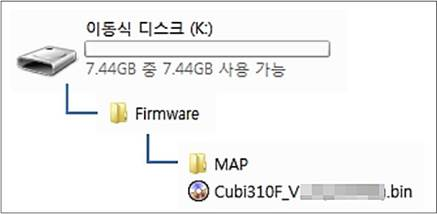
2) Please Put the USB memory stick that have New firmware file into Cubicon 3D Printer.
3) Go to “setting” in Cubicon 3D Printer and press “Firmware” and then “download”
* It is normal “100%” shall blinks many times and wait around 5 minutes.
4. After finishing firmware update, it automatically reboots. Go to “Information” and check the firmware version is well updated.
5. Go to “setting” -> “initialize” and wait around one minute. after that please re-boot the machine by pressing power switch.
(Revision History)
> FW v1.2.1 : Cubi310F_V1.2.1(170216).zip
(Important Matter)
- Communication Protocol was revised from v1.1.0 Firmware. Cubicreator v3.1 is aksed to use in order to connect Network.
- Please use USB memory stick to update v1.2.2 Firmware.
(Cubicreator Version and F/W Version might cause the problem while Firmware updating.)
- WiFi network Printing method is recommended assistance mean considering Data transmission.
- v1.2.0 Firmware is containing multi-national language package (Korean, English, Chinese), so it's volume is a lot incresed.
(It will take more time for updating.)
(Improvement)
- Network ON/OFF Function is added.
(Settings > Functions , ON/OFF function)
- At the beginning, Network function is off as default
(Turn on this function for use. if you touch "Store" button, it will be hold.)
- Other Bugs are modified and stabilized
> FW v1.2.1 : Cubi310F_V1.2.1(170216).zip
(Important Matter)
- Communication Protocol was revised from v1.1.0 Firmware. Cubicreator v3.1 is aksed to use in order to connect Network.
- Please use USB memory stick to update v1.2.1 Firmware.
(Cubicreator Version and F/W Version might cause the problem while Firmware updating.)
- WiFi network Printing method is recommended assistance mean considering Data transmission.
- v1.2.0 Firmware is containing multi-national language package (Korean, English, Chinese), so it's volume is a lot incresed.
(It will take more time for updating.)
(Improvement)
- USB Memory file copy function stabilization
- Auto Tilt Align performance improvement
- When temperature is not reached to its target, start to print error modified
- Cool-End Fan shall run when nozzle temperature is above 50 Celsius.
- When press backward button after checking File information, the file position is remained & displayed.
- Even print is done, Thumbnail will be displayed
- Other Bugs modified and stabilized

